What Is a Google Business Profile? A Guide for South African Businesses
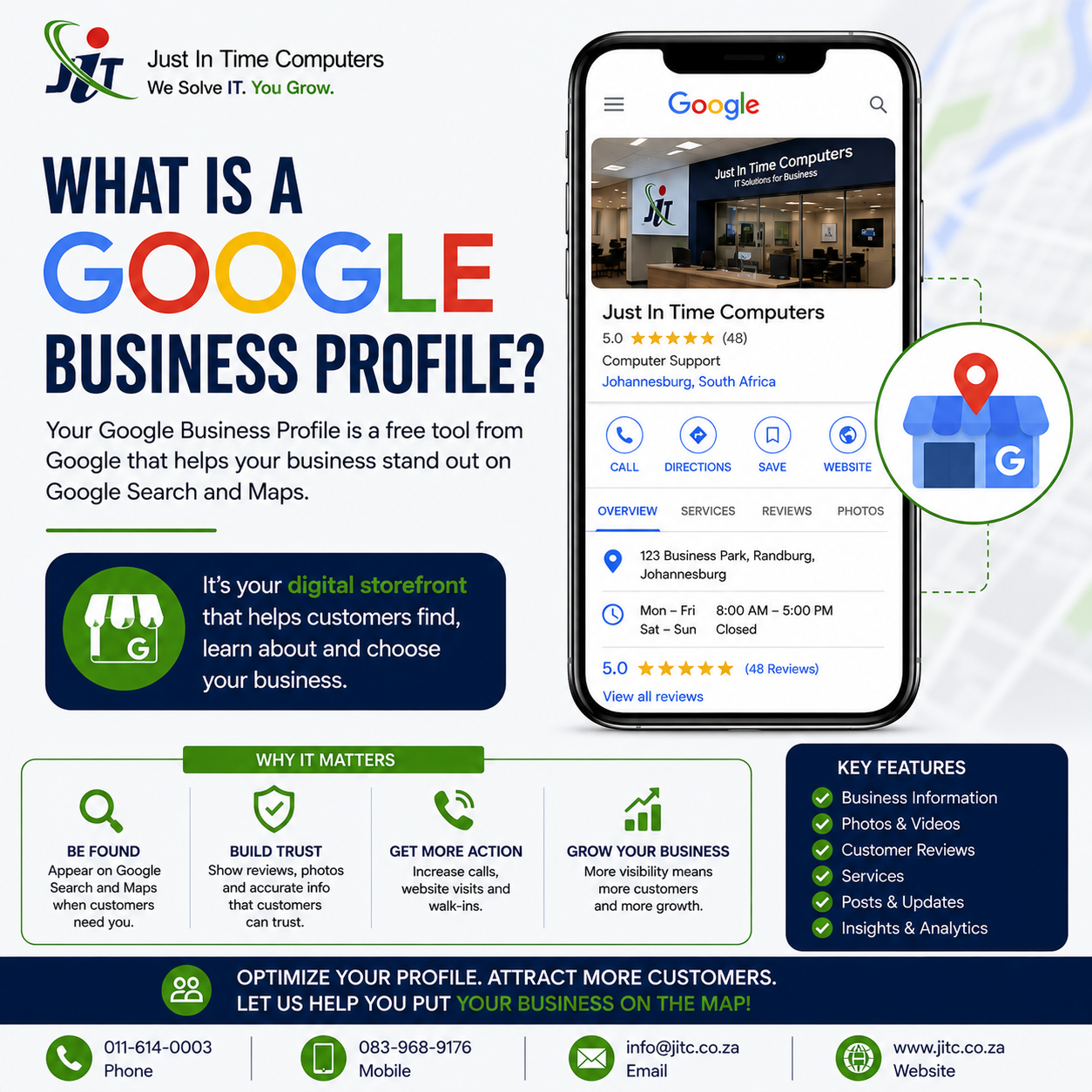
If you’ve ever searched Google for a restaurant, plumber, accountant or other business near you, you’ve probably seen Google Business Profiles without necessarily knowing what they’re called.
A Google Business Profile is the business listing that can appear when people search for your business — or businesses like yours — on Google Search and Google Maps.
It can display useful information such as your business name, address or service area, phone number, website, opening hours, photos, services and customer reviews.
For South African businesses that serve customers locally, having an accurate and well-maintained Google Business Profile can be an important part of being found online.
What Is a Google Business Profile?
Google Business Profile, previously known as Google My Business, is a free tool from Google that allows eligible businesses to manage how they appear across Google Search and Google Maps.
Depending on the type of business and the features available to you, your profile can include:
- Business name
- Primary and additional business categories
- Address or service area
- Phone number
- Website
- Opening hours
- Products and services
- Business description
- Photos and videos
- Customer reviews
- Business updates and posts
- Social media links
- Messaging or WhatsApp options where available
The important thing to understand is that a Google Business Profile isn’t simply an online directory listing.
For many potential customers, it may be one of the first things they see when they search for your business.
Is a Google Business Profile Free?
Yes. Creating and managing an eligible Google Business Profile is free.
You don’t need to pay Google simply to have your business listed on Google Search or Google Maps.
Businesses can manage their profiles directly through Google Search and Google Maps once they have claimed and verified them.
You may choose to pay a company to help optimise or manage your profile, but that is separate from the Google Business Profile itself.
Do I Need a Website to Have a Google Business Profile?
No. A website isn’t required to create an eligible Google Business Profile.
This makes Google Business Profile particularly useful for smaller businesses that don’t yet have a full website.
However, having a good website and an optimised Google Business Profile can work particularly well together.
Your profile can help people discover your business through local searches, while your website gives prospective customers somewhere to learn more about your services, experience, pricing or other information before contacting you.
Where Does a Google Business Profile Appear?
A Business Profile can appear in several places across Google, most notably Google Search and Google Maps.
For example, somebody might search:
- plumber near me
- IT support Johannesburg
- electrician Sandton
- accountant in Pretoria
- web design company Johannesburg
Google may show local businesses that it considers relevant to that search.
For searches with local intent, Google may also display a group of local results alongside a map. This is commonly referred to in the SEO industry as the local pack or map pack.
Being visible in these results can be valuable because the person searching is often already looking for a business that can provide a particular product or service.
Who Can Have a Google Business Profile?
Not every type of business is eligible.
Generally, Google Business Profiles are intended for businesses that have in-person contact with customers during their stated operating hours.
This includes businesses with physical locations that customers visit, as well as many businesses that travel to customers.
Examples include:
- Restaurants and coffee shops
- Retail stores
- Doctors and dentists
- Attorneys and accountants
- Plumbers
- Electricians
- Builders
- Cleaning companies
- IT support businesses
- Locksmiths
- Estate agents and other eligible local businesses
Online-only businesses that don’t have in-person contact with customers generally aren’t eligible for a Business Profile.
Before creating a listing, it’s worth checking Google’s latest Business Profile eligibility guidelines, particularly if your business operates entirely online, uses a virtual office or has an unusual business model.
Storefront, Service-Area or Hybrid Business?
How your Google Business Profile should be configured depends partly on how you serve customers.
Storefront businesses
A storefront business serves customers at a physical location.
A restaurant, retail shop or dental practice would be typical examples.
If customers genuinely visit and are served at your location during your stated business hours, displaying the business address will normally make sense.
Service-area businesses
A service-area business travels to customers rather than serving them at its address.
For example, a plumber may operate from home but travel throughout Johannesburg to complete work at customers’ properties.
If customers don’t visit and receive services at your address, Google says the address should generally be hidden from the public and a service area used instead.
Hybrid businesses
Some businesses do both.
A business might serve customers at its premises while also travelling to customers in surrounding areas.
In that situation, the profile may be configured as a hybrid business with both a location and appropriate service areas.
It’s important to configure this honestly. Adding locations or areas simply because you want to rank there isn’t a substitute for following Google’s guidelines.
Why Is Google Business Profile Important?
Think about how you search for a local business yourself.
If your geyser bursts, you’re probably not going to spend an hour researching the history of plumbing companies. You may search for something like “plumber near me”, look at a few businesses, check their reviews and opening hours, and make a call.
A well-maintained Google Business Profile helps make that process easier for your prospective customers.
It can help people:
- Discover your business
- See where you’re located or which areas you serve
- Find your phone number
- Visit your website
- Check your opening hours
- See your products or services
- Read customer reviews
- View photos of your business or work
- Get directions
- Contact you
That’s why your Business Profile shouldn’t be treated as something you set up once and forget about.
Does Google Business Profile Help With Local SEO?
Yes. Google Business Profile is an important component of local search visibility, although simply creating a profile doesn’t guarantee high rankings.
Google explains that local results are primarily based on three factors:
Relevance
Relevance is about how closely a local Business Profile matches what somebody is searching for.
Providing complete and accurate information helps Google understand what your business does.
Choosing appropriate business categories is particularly important.
For example, your primary category should describe what the business actually is rather than simply being the category with the highest search volume.
Distance
Distance considers how far a potential result is from the location used in a search.
This is one reason a business won’t necessarily appear for every search across an entire city or province.
Your location — and the searcher’s location — matter.
Prominence
Prominence relates to how well known or established a business is.
Google uses information it has about businesses from across the web, including links and other signals. Reviews and positive ratings can also contribute to local ranking.
This is why local SEO involves more than adding a few keywords to your Business Profile.
There is no legitimate setting that allows you to simply select every suburb in Johannesburg and automatically rank highly in all of them.
How to Optimise Your Google Business Profile
There isn’t one trick that suddenly makes a profile rank number one.
A better approach is to make the profile as accurate, complete and genuinely useful to customers as possible.
Here are some of the areas worth checking.
1. Use your real business name
Your profile name should reflect the name your business uses in the real world.
Don’t add extra services, suburbs or keywords to the business name simply to try to improve rankings.
For example, if your actual business name is “Example Plumbing”, changing the profile to something like “Example Plumbing Best Plumber Johannesburg Sandton Emergency Plumbers” isn’t a sensible optimisation strategy.
It may also conflict with Google’s guidelines.
2. Choose the right business categories
Your primary category is one of the clearest ways to tell Google what type of business you operate.
Choose the category that most accurately describes your core business.
You can then add relevant secondary categories where appropriate.
Avoid choosing categories for services you don’t actually provide.
3. Complete your contact information
Make it easy for customers to contact you.
Check that your:
- Phone number is correct
- Website link works
- Address or service area is accurate
- Opening hours are current
- Special or holiday hours are updated when necessary
Incorrect information creates a poor experience for customers and can cost you enquiries.
4. Add your products and services
Where appropriate, add the products or services your business actually provides.
This helps potential customers understand what you offer before they contact you.
Keep descriptions clear and written for humans rather than stuffing them with repeated keywords.
5. Write a useful business description
Your description should briefly explain what your business does, who you help and what makes the business useful to prospective customers.
Relevant words and phrases will occur naturally when you accurately describe your services.
There’s no need to repeat “plumber Johannesburg” twenty times.
Write for the customer first.
6. Add good-quality photos
Photos can help customers understand your business and decide whether they feel comfortable contacting you.
Depending on your industry, useful photos might include:
- Your premises
- Your team
- Completed projects
- Products
- Vehicles
- Equipment
- Before-and-after examples
Use genuine images that accurately represent your business whenever possible.
7. Ask customers for reviews
Reviews are an important part of a Google Business Profile.
They provide potential customers with information about other people’s experiences with your business and can help build confidence.
After completing a job or serving a customer, consider asking them to leave an honest Google review.
Don’t buy fake reviews or offer incentives in ways that violate Google’s policies.
8. Respond to your reviews
Getting reviews is only part of reputation management.
Responding to them shows that the business is active and pays attention to customer feedback.
Thank customers for positive reviews, and handle negative reviews professionally.
A defensive argument with an unhappy customer in public rarely makes a business look better.
9. Keep your profile updated
Businesses change.
Phone numbers change, employees leave, opening hours change and new services are introduced.
Review your profile periodically to make sure everything is still correct.
Depending on your business and the features available, you can also publish updates, offers, events or other posts.
Can You Add WhatsApp to a Google Business Profile?
For eligible verified profiles and supported regions, Google provides options that may allow businesses to add WhatsApp or text messaging contact details.
If this feature is available on your profile, it can make contacting your business easier for customers who prefer messaging to making a phone call.
This can be particularly useful in South Africa, where WhatsApp is widely used for business enquiries.
Feature availability can vary, so check the options currently shown when editing your Business Profile.
Can You Add Social Media Profiles?
Google also supports social profile links for eligible Business Profiles in supported regions.
Depending on availability, these can include platforms such as:
- TikTok
- X
- YouTube
Adding the correct profiles gives prospective customers another way to learn about your business and helps maintain a consistent online presence.
Common Google Business Profile Mistakes
A few mistakes can undermine an otherwise good profile.
Keyword stuffing the business name
Adding keywords or locations that aren’t genuinely part of your business name may violate Google’s guidelines.
Using an address where customers aren’t served
If you operate from home and travel to customers, don’t display your residential address simply because you think it will improve your rankings.
Configure the business correctly as a service-area business where applicable.
Creating unnecessary duplicate listings
More profiles don’t automatically mean more visibility.
Creating multiple profiles for the same business or setting up fake locations can create problems rather than improve your local SEO.
Choosing irrelevant categories
More categories aren’t always better.
Choose categories that accurately represent the business.
Ignoring reviews
A profile with unanswered reviews can look neglected, particularly when customers have raised legitimate concerns.
Letting information become outdated
Wrong opening hours, disconnected phone numbers and old website links frustrate customers.
Expecting instant rankings
Creating or verifying a Google Business Profile doesn’t guarantee that you’ll immediately appear at the top of every local search.
Local visibility depends on numerous factors, including relevance, distance and prominence.
Google Business Profile Checklist
If you already have a profile, spend a few minutes checking the following:
- Is your business name accurate?
- Is the correct primary category selected?
- Are your secondary categories relevant?
- Is your phone number correct?
- Does your website link work?
- Are your opening hours current?
- Is your address or service area configured correctly?
- Have you added your main products or services?
- Is your business description accurate?
- Do you have recent, genuine photos?
- Are you regularly receiving legitimate customer reviews?
- Are you responding to reviews?
- Are your social media links correct where available?
- Is WhatsApp or messaging configured if appropriate and available?
- Does the information on your profile match the information on your website?
If you answered “no” to several of these, your Business Profile could probably use some attention.
Frequently Asked Questions
Is Google Business Profile the same as Google My Business?
Yes. Google My Business was the previous name for the platform. Google now calls it Google Business Profile.
You may still hear people use “Google My Business” or “GMB”, particularly in older articles and within the SEO industry.
How much does a Google Business Profile cost?
Creating and managing an eligible Google Business Profile is free.
You may choose to pay an agency or consultant to optimise and manage it, but you don’t pay Google simply for having the profile.
Can I create a Google Business Profile if I work from home?
Potentially, yes, if your business meets Google’s eligibility requirements and you have in-person contact with customers.
If customers don’t visit your home to receive services, you should generally hide the address and configure the profile as a service-area business.
Can I have more than one Google Business Profile?
It depends on the business.
A legitimate business with multiple staffed locations may be eligible for a profile for each qualifying location.
Creating additional profiles simply to target different suburbs or keywords isn’t the same thing as operating genuine locations and can conflict with Google’s guidelines.
Why isn’t my business showing on Google Maps?
There are many possible reasons.
Your profile may be new, unverified, incomplete or affected by an account/profile issue. It may also simply not rank prominently for the particular search and location you’re testing.
Remember that local results are influenced by relevance, distance and prominence, so two people in different parts of Johannesburg can potentially see different businesses for the same search.
Do Google reviews help rankings?
Google states that more reviews and positive ratings can help a business’s local ranking, but reviews are only one part of the picture.
Reviews are also valuable because prospective customers often read them before deciding which business to contact.
Focus on earning genuine reviews from real customers rather than trying to manipulate the system.
How long does Google Business Profile verification take?
Verification methods and processing times can vary.
Google determines which verification methods are available to a particular business, so you may see options such as video, phone, email or other methods depending on the profile.
Follow the verification process Google presents for your business rather than relying on an old tutorial that assumes everyone receives the same method.
Is a Google Business Profile Enough to Rank Locally?
Not necessarily.
An accurate, well-optimised Business Profile is an important starting point, but competitive local SEO can involve much more.
Depending on your business and market, this may include:
- Your website and its content
- Relevant local landing pages
- Consistent business information across the web
- Links from other websites
- Customer reviews
- Business prominence
- On-page SEO
- Technical SEO
- Local citations
- The quality and relevance of your overall online presence
And there is one factor no SEO company can change: distance.
If a potential customer is searching from the other side of a large city, Google may determine that another relevant business closer to them is a better local result.
That’s why promises to rank a business number one everywhere should be treated carefully.
Need Help Improving Your Google Maps Visibility?
You can do a lot of Google Business Profile optimisation yourself.
Start by completing the checklist above, making sure your information is accurate, choosing the right categories, adding useful services and photos, and building a steady flow of genuine customer reviews.
If you’ve already done the basics but your business still isn’t getting the local visibility you’d like, there may be opportunities beyond the profile itself.
At JITC, we help South African businesses improve their Google Business Profile and broader local search presence, with the goal of helping the right customers find them when they’re searching for their services.
Our approach looks beyond simply filling in a profile. Depending on your business, competition and existing online presence, we can identify opportunities involving your Business Profile, website, local SEO signals and Google Maps visibility.
Want to improve your visibility on Google Maps?
Learn more about our Google Business Profile and Google Maps Ranking services, or contact JITC to discuss your business and the areas you want to reach.
No Comments